Short-form video moves fast, and the easiest concepts often spread the furthest. Cute baby clips, funny pet edits, and meme-style dance loops all have one thing in common: they are quick to understand, instantly visual, and highly shareable. That is exactly why AIFacefy’s AI dance video generator is such a practical tool for creators who want to turn a still image into a scroll-stopping social post.
Instead of filming a dancer from scratch, you can start with a reference clip, upload the subject image, add a prompt only when needed, choose the version you want, and generate a short that fits TikTok-style viewing habits. The workflow is simple enough for beginners, but it is flexible enough for meme creators, pet-page owners, and social media marketers who want to test multiple content ideas quickly.
In this guide, we will walk through how to use AIFacefy to make viral-ready dance shorts, how to write better prompts when you need them, and what to try next on the platform once you are comfortable with the basics.
Why dance shorts work so well on TikTok
TikTok rewards content that is easy to read in the first second. A dancing baby, a grooving dog, or a cat moving to a recognizable rhythm can deliver that instantly. These clips do not need a long setup. Viewers immediately understand the joke, the cuteness, or the style, which makes them more likely to watch, replay, and share.
That is where an AI video dance generator becomes useful. You are not building a complicated cinematic sequence. You are creating a short, expressive visual idea that feels alive right away. A single portrait can become a funny dance loop, a pet photo can turn into a meme post, and a baby image can become a family-friendly short designed for engagement.
For creators who care about volume and testing, this matters. You can try several concepts with different images, reference clips, and captions without needing a full video shoot every time.
What to prepare before you start
Before opening the generator, get clear on the type of short you want to make. Are you aiming for cute, funny, absurd, stylish, or obviously meme-driven? A focused direction helps you choose the right input image and the right motion style.
You only need a few things:
- A clear subject image
- An optional dance reference video
- A prompt if you are not relying entirely on the reference clip
- A posting goal, such as a baby edit, a pet meme, or a vertical dance short
The image matters more than many people think. Choose one with a readable face, clean lighting, and a strong subject outline. Full-body or upper-body images usually work better than tightly cropped portraits when the goal is dance motion.
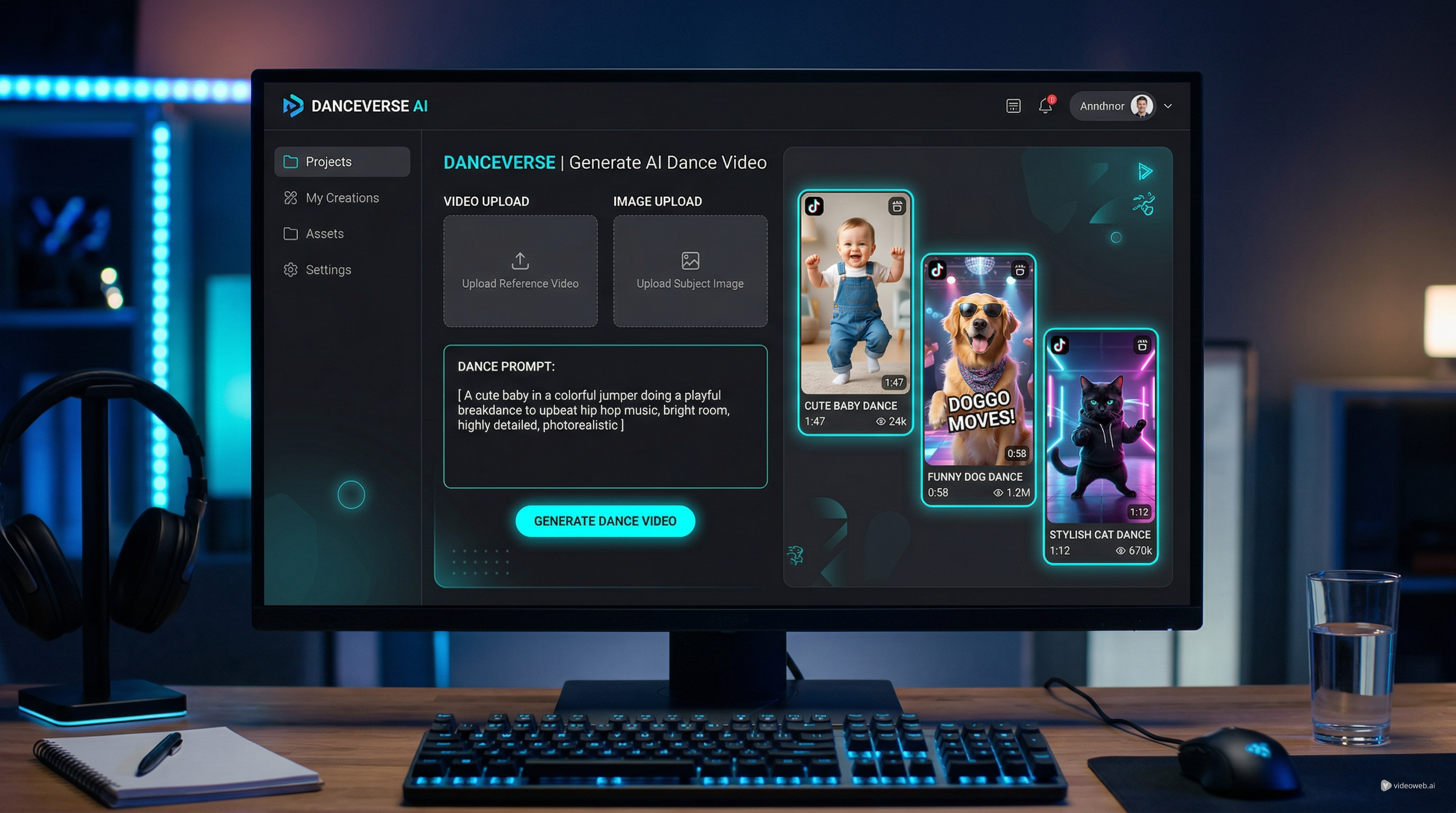
The optional reference video is highly recommended. If you already have a dance clip with the motion you want, the workflow becomes much easier because the tool can use that motion as a guide. In many cases, this is the fastest path to a good result and reduces the need for a detailed prompt.
Step-by-step: how to use AIFacefy’s dance tool
The platform’s workflow is simple, which is part of its appeal. Here is the practical process for creating your first short with the AI Baby Dance Video Generator or any similar dance concept.
1. Upload a reference dance video after turning the toggle on
This step is optional but recommended. A reference clip gives the tool clear motion to follow and usually works better than a long prompt. For short-form content, choose simple, energetic dance moves that read well on mobile.
2. Upload the image of your subject
Upload the person, baby, cat, or dog image you want to animate. Use a clear, well-lit photo with a readable face and pose. For an AI pet dance video, images with strong expressions usually work best. You can also try an AI cat dance video for cute reaction posts or an AI dog dance clip for playful meme content.
3. Add a prompt if needed
If you uploaded a reference clip, the prompt is optional. Without one, write a short prompt that describes the subject, dance style, and mood.
4. Choose STD or Pro
Use STD for quick testing and Pro for a more polished final version. A practical workflow is to test in STD, then render the best idea in Pro.
5. Click Generate
Generate the video and review the result. If it does not look right, try a better image, a simpler prompt, or a clearer reference clip.
How to write a better baby dance prompt when no reference video is used
When you skip the reference clip, prompting becomes much more important. A good baby dance AI prompt does not need to be long. It needs to be clear.
A simple formula works well:
subject + dance style + mood + setting + camera feel
For example:
- Cute baby doing a cheerful pop dance in a bright nursery, playful mood, smooth camera movement, vertical short-video style
- Fluffy dog doing a funny upbeat dance in a living room, energetic and adorable, meme-friendly style, centered framing
- Orange cat doing a rhythmic side-step dance with exaggerated charm, soft indoor light, loopable short-form video feel
The most common mistake is trying to micromanage every movement. You do not need to write choreography line by line. Focus on the overall energy of the clip. For short-form social content, vibe matters more than dense technical description.
Another good tactic is to decide whether you want the result to feel cute, stylish, or absurd. That emotional direction will do more for the final output than a long paragraph of overly detailed instructions.
Viral ideas: babies, pets, and meme-ready clips
One reason this tool is easy to recommend is that it works well across several content styles.
The first is the classic baby short. A smiling baby image paired with a clean dance rhythm can produce a funny, family-safe post that feels instantly shareable. This is the most obvious use case for an AI baby dance video generator, and it is easy to see why it performs well: it combines novelty, motion, and cuteness in a format viewers understand immediately.
The second is pet content. A cat or dog photo can become a social-ready short with almost no setup. This makes the tool especially attractive for animal accounts and meme pages. A stylized dog dance meme format works especially well when you pair it with a recognizable caption, reaction text, or trending audio.
The third is general creator experimentation. Even if you are not posting baby or pet content, you can still use the generator to make light, humorous clips for audience engagement, reaction edits, or niche community jokes.
STD vs Pro: which one should you use?
Many users overthink this part. In practice, the right choice depends on what stage you are in.
Use STD when:
- You are testing several concepts
- You want to compare different images or prompts
- You are making draft versions before deciding what to post
Use Pro when:
- You have already found the best concept
- You want a cleaner final result
- You are preparing the version you actually intend to publish
For most creators, the most efficient workflow is simple: test in STD, finish in Pro. That approach saves time and makes it easier to improve ideas instead of committing too early to a single version.
Tips for making better AI dance videos for TikTok
If your goal is to make AI dance videos for TikTok rather than just experiment for fun, a few habits make a big difference.
First, keep the opening visual strong. The subject should be easy to understand in the first second. Busy backgrounds and weak crops can hurt performance before the viewer even notices the dance.
Second, design for vertical viewing. Use a ratio that fits short-form social platforms and keep the subject centered when possible. That makes the motion easier to read on mobile screens.
Third, aim for short, repeatable clips. Dance content often works best when it feels loopable. A compact, memorable motion pattern is usually more effective than a long sequence.
Fourth, test multiple versions. A different image or a slightly better prompt can change the whole feel of the result. Social content is often a numbers game, and fast iteration is one of the main advantages of an AI tool like this.
Finally, remember that the visual is only part of the post. Captions, timing, and music still matter. Even a simple generated clip can perform better when the concept is paired with a good text hook and the right audio choice.
Common mistakes to avoid
The first mistake is using a poor source image. If the photo is blurry, badly cropped, or hard to read, the result usually suffers.
The second is overcomplicating the prompt. This is especially common when there is no reference clip. Short, clear instructions usually work better than cluttered ones.
The third is choosing weak motion references. If the dance video is visually unclear or too complex, the generated result can feel less convincing.
The fourth is forgetting the platform. If you are making TikTok-first content, optimize the framing, length, and visual clarity for vertical scrolling instead of treating it like a general-purpose video.
Other tools and models worth trying on AIFacefy
Once you are comfortable with the dance workflow, AIFacefy becomes more useful as a broader creative toolkit rather than a single-feature generator.
You can recommend or explore:
- Photo to Video for simple motion-based animations from a single image
- Image to Video for stylized visual motion experiments
- Text to Video for generating supporting clips, intros, or transitions
- Video to Video for restyling an existing dance result into a different visual look
- AI Face Dance for close-up meme and expression-driven content
- AI Talking Avatar for intros, character-style presenter clips, or commentary segments before the dance
- Text to Music and Image to Music for experimenting with audio-driven creative ideas around your short videos
For users who want to branch into broader video generation workflows, AIFacefy also highlights advanced model options such as Veo 3.1, Kling Motion Control, Vidu Q1, and Seedance 2.0. These are useful to mention because they give creators more room to grow once they want something beyond quick meme-style dance content.
Final thoughts
AIFacefy’s dance workflow is appealing because it does not make the process harder than it needs to be. If you already have a dance reference clip, the path is especially simple: upload the video, upload the subject image, add a prompt only if you want extra control, choose STD or Pro, and generate.
That makes the tool a practical option for creators who want fast social content rather than a long production pipeline. Whether you are making baby edits, pet jokes, or playful meme loops, the platform gives you a quick way to turn a still image into a short with motion and personality.
If your goal is to create more engaging short-form content with less manual work, this is an easy tool to test. Start simple, iterate a few concepts, and let the strongest idea become the version you post.
Related Article
- AI Dance Video With Kling Motion Control: A Step-by-Step Tutorial
- How to Create Viral Face Dance Videos Using an AI Face Animator
- AIFacefy Image to Video Generator: One Hub for Modern Image-to-Video AI Workflows
- How to Use Image to Video with Audio by Veo 3